If you trade crypto from a personal wallet (rather than an exchange), those transactions have to be declared too. The problem is that wallets are not like Binance or Coinbase: many of them do not export a CSV directly. Here we explain how to extract your history from each wallet so we can calculate your gains and losses.
What do we need from your wallet?
To prepare your tax report we mainly need the public address (or both of the following):
| Method | What it is | When to use it |
|---|---|---|
| Public address | Your wallet’s address on each blockchain | Whenever possible (the preferred method) |
| CSV export | A file containing the transaction history | When the wallet allows it |
Important: your public address gives no access to your funds. It only allows the blockchain transactions to be viewed, and those are already public. It is like giving out your IBAN: people can see the movements, but they cannot move your money.
Hardware wallets (cold wallets)
Cold wallets are the safest and the most widely used for long-term storage. The good news is that the main ones offer CSV export.
Ledger

Nano X · Nano S Plus · Flex · Stax
Supported blockchains: 5,500+ cryptocurrencies. Bitcoin, Ethereum, Solana, Polygon, BNB Chain, Cardano, XRP, Polkadot, Avalanche, Tron, Cosmos and more.
How to export the CSV from Ledger Live, step by step:
Step 1: open Settings
Open Ledger Live and click the gear icon (Settings) in the top right-hand corner.
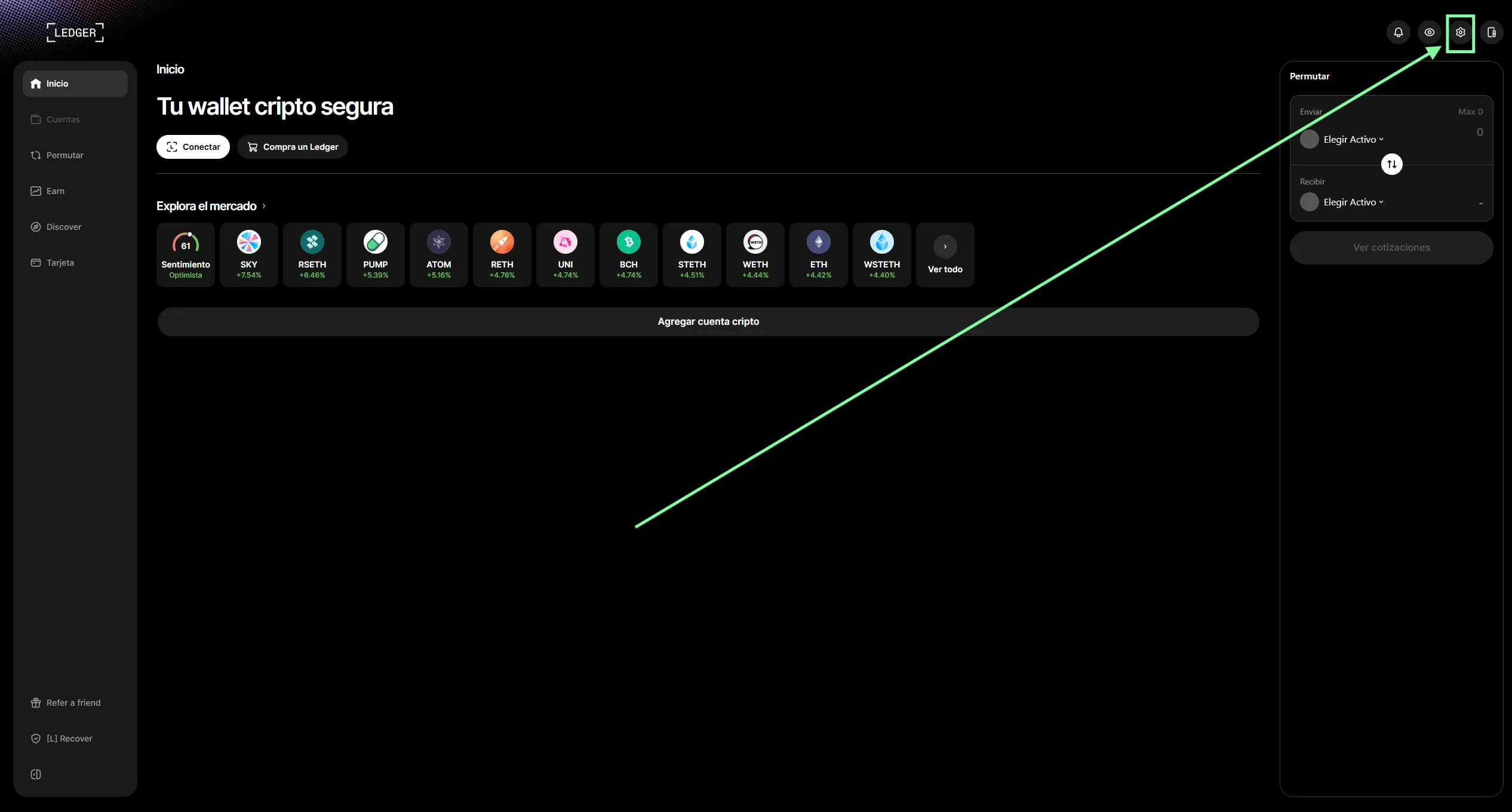
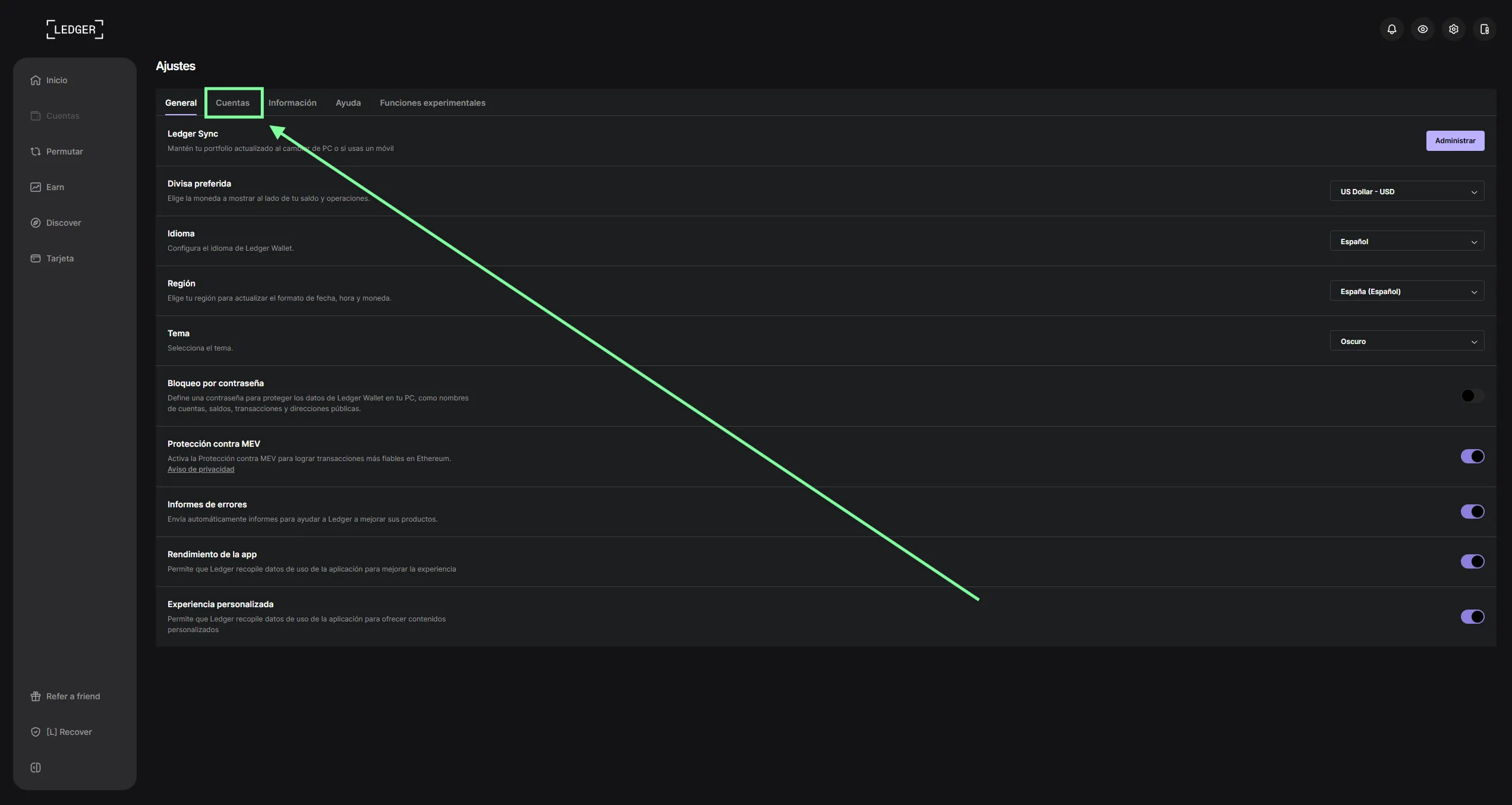
Step 2: go to the “Accounts” tab
Inside Settings, click the “Accounts” tab.
Step 3: download the operation history
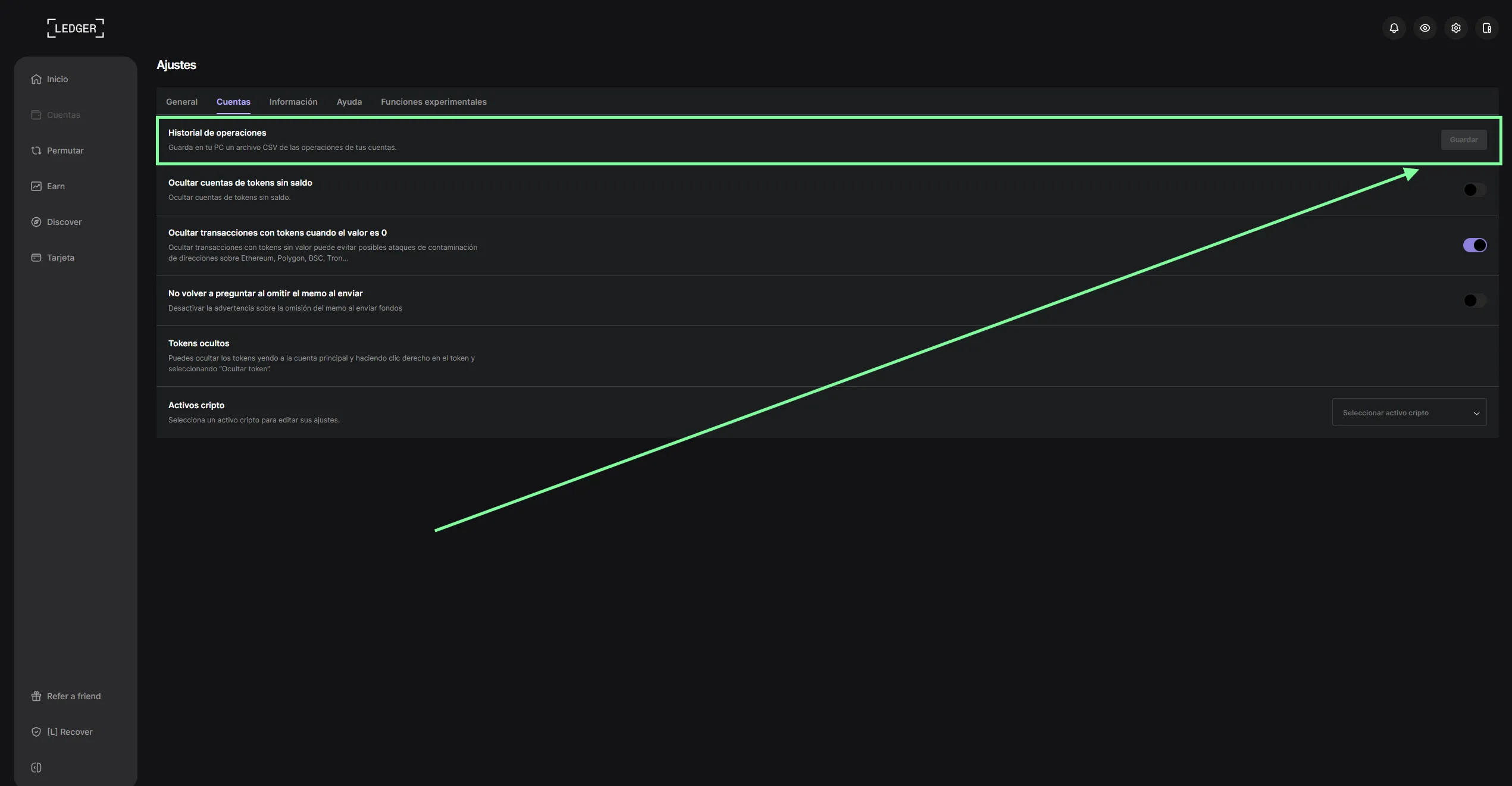
Under the first option, “Operation history”, click the “Save” button. A CSV file with every operation across your accounts will be downloaded.
- Public address: also visible in Ledger Live for each asset. For Bitcoin you can export the xPub (extended public key), which makes it possible to trace every derived address.
Video tutorial: you can also watch the process on video:
What you need to send us:
- One CSV for each cryptocurrency you have used, or
- Your public addresses for every blockchain you have traded on
Note: if you used your Ledger connected to MetaMask or Rabby to trade in DeFi, those transactions will not appear in Ledger Live. You will also need to give us the public address of the wallet you connected (normally your EVM address).
Trezor

Model One · Model T · Safe 3 · Safe 5
Supported blockchains: 1,500+ cryptocurrencies. Bitcoin, Ethereum, BNB Chain, Solana, Cardano, Polkadot, XRP, Litecoin, Avalanche and more.
How to export your activity:
- CSV from Trezor Suite: open Trezor Suite > “Accounts” tab > select the account > in the transactions section, click ”…” > “Export as CSV”. It also allows PDF and JSON exports.
- Public address / xPub: visible in Trezor Suite. The xPub can be used to trace every Bitcoin address.
Video tutorial: in this video we show you how to export the CSV from Trezor Suite:
What you need to send us:
- One CSV for each cryptocurrency, or
- Your public addresses / xPub
Note: just as with Ledger, if you connected your Trezor to MetaMask for DeFi, we will need the public address of that wallet in order to trace those transactions.
Summary table: what can you export from each wallet?
| Wallet | CSV export? | Public address? | Recommended method |
|---|---|---|---|
| Ledger | Yes | Yes + xPub | CSV from Ledger Live |
| Trezor | Yes | Yes + xPub | CSV from Trezor Suite |
We will be expanding this guide with more wallets (hardware, browser, mobile and DeFi) shortly.
Useful blockchain explorers
If you need to build a CSV by hand from your public address, these are the most widely used explorers by network:
| Blockchain | Explorer | URL |
|---|---|---|
| Ethereum | Etherscan | etherscan.io |
| Polygon | Polygonscan | polygonscan.com |
| BNB Chain | BscScan | bscscan.com |
| Arbitrum | Arbiscan | arbiscan.io |
| Optimism | Optimistic Etherscan | optimistic.etherscan.io |
| Base | Basescan | basescan.org |
| Avalanche | Snowscan | snowscan.xyz |
| Solana | Solscan | solscan.io |
| Bitcoin | Mempool.space | mempool.space |
| Tron | Tronscan | tronscan.org |
| Cosmos | Mintscan | mintscan.io |
On all of them you can paste your address and, on most, download a CSV with the transaction history.
Frequently asked questions
Is it safe to share my public address?
Yes. Your public address only allows transactions to be viewed, not funds to be moved. It is information that is already visible on the blockchain to anyone. It is not the same as your private key or seed phrase (those you must never share with anyone).
What if I have several wallets?
We need the information from all of your wallets. Send us the addresses or CSVs for each one. It is common to have a Ledger or Trezor for storage and another software wallet for DeFi, for example.
Can DeFi activity (swaps, staking, liquidity) be exported too?
Yes, but it requires specialist processing. Swaps on Uniswap, liquidity positions on Aave, staking across various protocols… it is all recorded on the blockchain. With your public address we can extract all of this information.
What do I do if my wallet is not on this list?
Send us the name of the wallet and your public address. If the blockchain is public (almost all of them are), we will be able to extract your history anyway using blockchain explorers.
And exchange wallets (Binance, Kraken, etc.)?
Those are not personal wallets, they are exchange accounts. Exchanges have their own export methods (CSV and API). See our specific guide for each exchange on the blog.
Summary: what do you need to send us?
- If your wallet exports a CSV: export it and send it to us unmodified
- If your wallet does not export a CSV: send us your public address for each blockchain
- If you have a Bitcoin wallet: the CSV or your xPub (extended public key)
- If you used DeFi with a hardware wallet: we also need the address of the software wallet you connected (MetaMask, Rabby, etc.)
Need help with your wallet activity?
At Cryptoimpuestos we process the history of any wallet, however complex your activity. DeFi, NFTs, staking, multiple chains… we unify it all and calculate your gains and losses using the FIFO method.

Víctor Lázaro
Tax adviser, Cryptoimpuestos.es